

Cloud-Native Media Management: The Arr Suite and Plex on K8s
Deploying stateless microservices on Kubernetes is straightforward. If a pod crashes, the ReplicaSet spins up a new one identically. But what happens when you introduce stateful, storage-heavy applications?
For many homelab enthusiasts, the transition from Docker Compose to Kubernetes stalls at media management. Applications like Plex, Radarr, Sonarr, and Transmission require massive, persistent storage pools, hardware transcoding access, and specialized network routing.
In this article, we’ll build a production-grade media stack on Kubernetes by taking actual patterns from my homelab (checkout the full deployment in my YogaNovvaindra/kube GitHub repo):
- CephFS OS-Level Mounts to provide massive distributed storage globally via
hostPath. - The Arr Suite connecting Radarr, Sonarr, and Transmission to the exact same directory structures.
- Renovate and Keel working together to automate semver (Semantic Versioning) and
:latestimage tag updates. - Plex Hardware Transcoding passing Intel GPUs (
/dev/dri) dynamically into our containers.
Architecture Flow
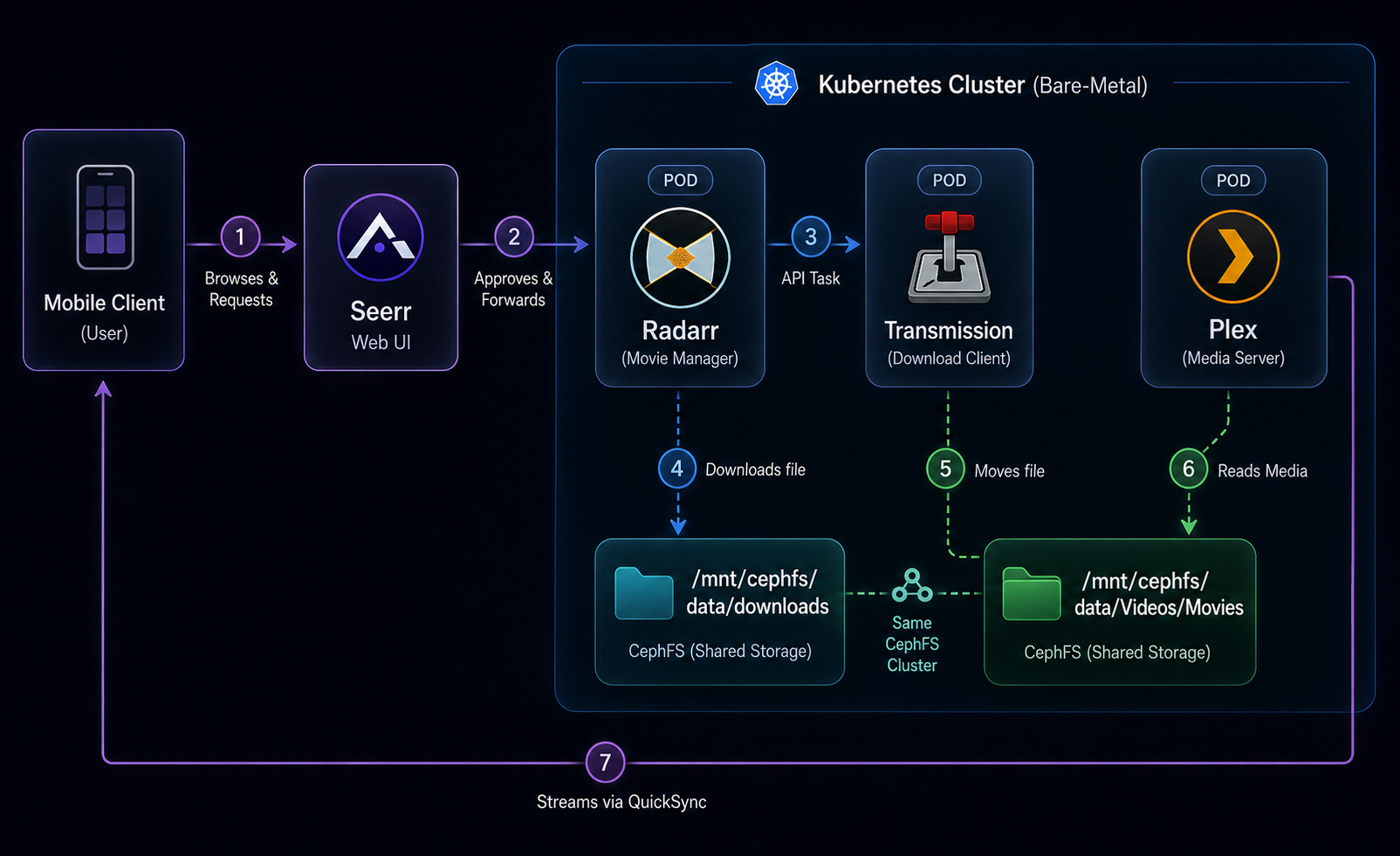
Before diving into YAML, let’s visualize how media is acquired, processed, and served across our cluster. The entire process starts with a beautiful, Netflix-like UI where users can search for and request content.
Step 1: Solving the Storage Problem with CephFS
In a multi-node Kubernetes cluster, a Pod can be scheduled on any node. This generally forces you to use massive network storage.
While many use Rook-Ceph's native CSI drivers, I use a robust bare-metal pattern: my physical Ubuntu nodes mount my CephFS array at the OS level to /mnt/cephfs. Inside Kubernetes, I then map this massive storage directly into my pods using hostPath.
For configuration data, we use persistent volumes to avoid file locks. Here is how I provision the PVC for Radarr's config in my storage.yml:
apiVersion: v1
kind: PersistentVolume
metadata:
  name: media-radarr-pv
spec:
  capacity:
    storage: 256Mi
  accessModes:
    - ReadWriteMany
  persistentVolumeReclaimPolicy: Retain
  storageClassName: cephfs
  hostPath:
    path: /mnt/cephfs/docker/media/radarr
    type: Directory
Step 2: Deploying the Arr Suite with Renovate Automation
With our storage strategy clear, deploying Radarr becomes a matter of mounting volumes correctly and ensuring our local registry caching works.
Let’s look at my actual radarr.yml. Notice how I pull through my local Harbor cache (reg.ygnv.my.id) and use nodeSelector to pin heavy workloads to high-performance nodes. More importantly, notice the strict semantic versioning (6.1.1). I use Renovate on my GitHub repository to automatically create pull requests whenever a new SemVer release is pushed, ensuring stateful configuration databases don't break unexpectedly from unpinned tagged updates.
apiVersion: apps/v1
kind: Deployment
metadata:
  name: radarr
  namespace: media
spec:
  template:
    spec:
      nodeSelector:
        kubernetes.io/hperf: "true"
      containers:
        - name: radarr
          image: reg.ygnv.my.id/docker/linuxserver/radarr:6.1.1
          env:
            - name: PUID
              value: "1000"
            - name: PGID
              value: "1000"
            - name: TZ
              value: "Asia/Jakarta"
          volumeMounts:
            - name: radarr-config
              mountPath: /config
            - name: radarr-movies
              mountPath: /movies
            - name: radarr-downloads
              mountPath: /downloads
      volumes:
        - name: radarr-config
          persistentVolumeClaim:
            claimName: media-radarr-pvc
        - name: radarr-movies
          hostPath:
            path: /mnt/cephfs/data/Videos/Movies # Shared OS Mount!
            type: Directory
        - name: radarr-downloads
          hostPath:
            path: /mnt/cephfs/data/downloads # Shared OS Mount!
            type: Directory
[!IMPORTANT] Homelab Best Practice: Hardlinking By ensuring that bothradarrand my download client (transmission) have access to/mnt/cephfs, Radarr can use hardlinks instead of copying files from/downloadsto/movies. This saves terabytes of space.
Step 3: Automated Downloading with Keel
Instead of manually managing torrent versions, I deploy Transmission. To bypass Cloudflare protections on certain trackers managed by Prowlarr, I deploy FlareSolverr alongside it.
While Renovate is fantastic for SemVer (6.1.1), sometimes you just want a truly hands-off rotation for pods running the :latest tag. This is where I heavily rely on Keel for automated image polling.
From my download.yml:
apiVersion: apps/v1
kind: Deployment
metadata:
  name: transmission
  annotations:
    keel.sh/policy: force
    keel.sh/trigger: poll
    keel.sh/match-tag: "true"
    keel.sh/pollSchedule: "@every 6h"
spec:
  template:
    spec:
      containers:
        - name: transmission
          image: linuxserver/transmission:latest
Every 6 hours, Keel checks if the upstream linuxserver/transmission:latest image hash has changed. If it has, it automatically gracefully rotates my Transmission pods in the background—true hands-off GitOps!
Step 4: Hardware Transcoding with Plex
Plex needs to talk to the physical CPU's integrated graphics to handle 4K hardware transcoding efficiently. Instead of complex resource limits, the most direct path on bare-metal is mapping the GPU node directly into the container using a directory hostPath.
Lastly, we also want to expose Plex on a dedicated local IP (so DLNA works without routing headaches). We use MetalLB for this. Here is my exact player.yml:
apiVersion: apps/v1
kind: Deployment
metadata:
  name: plex
spec:
  template:
    spec:
      nodeSelector: # Pin Plex to the node with the GPU
        kubernetes.io/hostname: kube-2
      containers:
        - name: plex
          image: reg.ygnv.my.id/docker/linuxserver/plex:1.43.2
          volumeMounts:
            - name: dev-dri
              mountPath: /dev/dri # Internal container path
            - name: plex-movies
              mountPath: /movies
      volumes:
        - name: dev-dri
          hostPath:
            path: /dev/dri # Physical host Intel QuickSync GPU
            type: Directory
---
apiVersion: v1
kind: Service
metadata:
  name: plex
  annotations:
    metallb.io/address-pool: "main-pool"
spec:
  type: LoadBalancer
  loadBalancerIP: 10.1.1.53 # Dedicated MetalLB IP
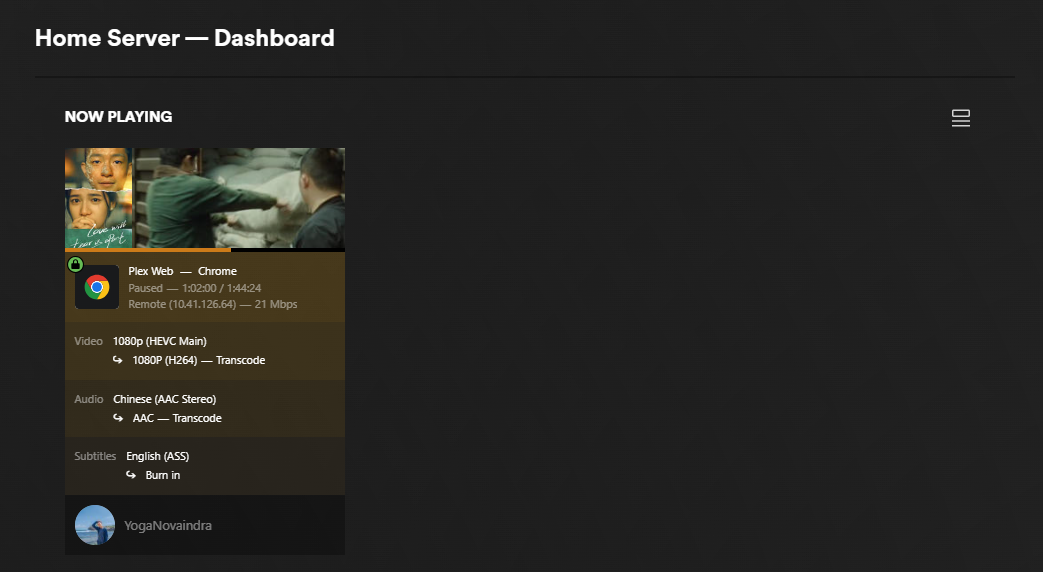
Once deployed, Plex detects the mounted /dev/dri transcoder. Any multi-user streaming load drops from 80% CPU usage down to less than 5%!
Step 5: The Netflix Front-Door (Seerr)
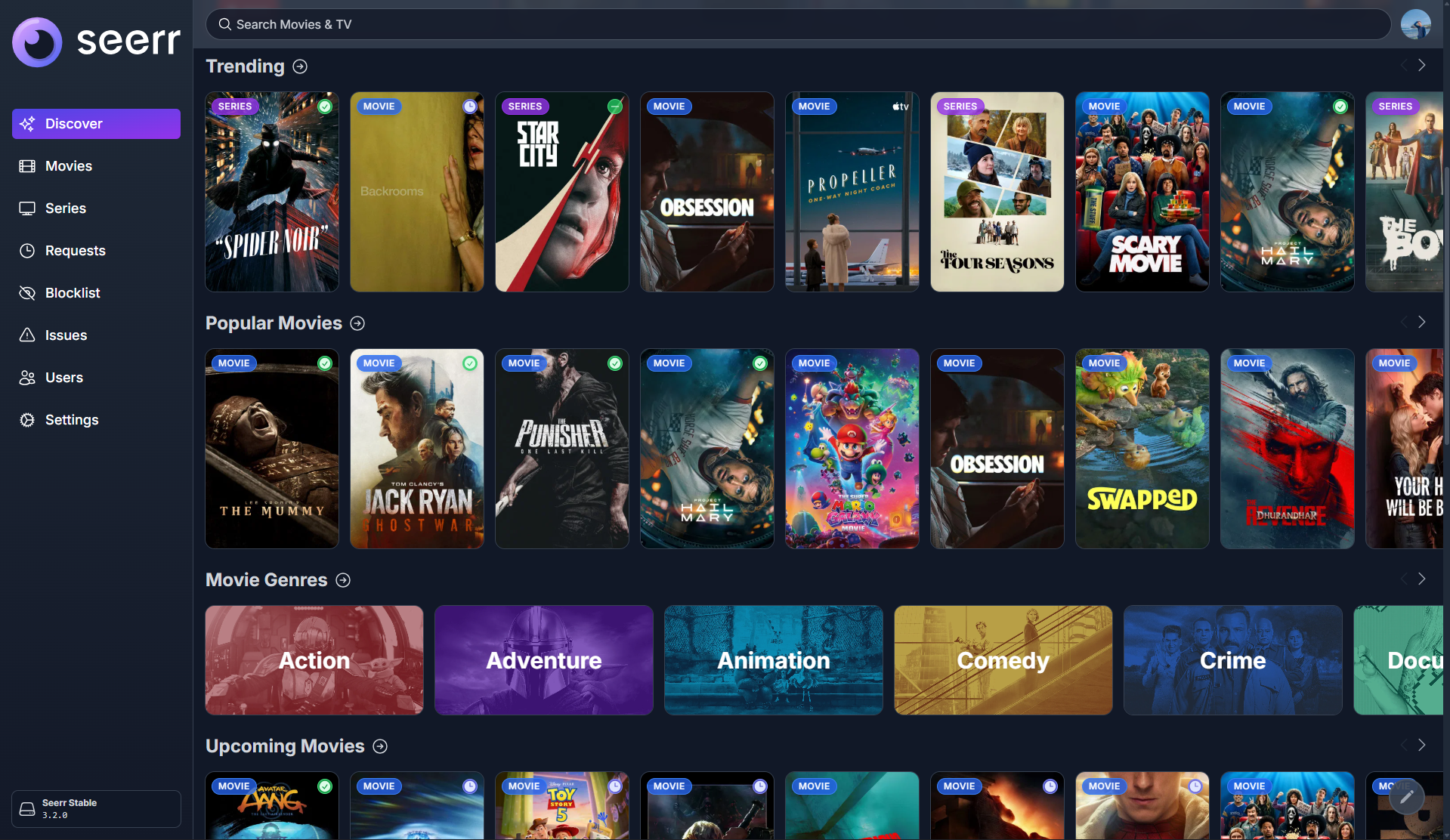
Infrastructure is great, but the end-user experience is what makes a homelab truly magic. Instead of forcing friends and family to learn how to use Radarr or Sonarr, we deploy Seerr.
Seerr provides a beautiful, Netflix-like web interface. Users simply search for a movie, click "Request", and Seerr automatically sends the API calls to Radarr/Sonarr to start the download.
From my seerr.yml:
apiVersion: apps/v1
kind: Deployment
metadata:
  name: seerr
spec:
  template:
    spec:
      containers:
        - name: seerr
          image: reg.ygnv.my.id/ghcr/seerr-team/seerr:v3.2.0
          ports:
            - containerPort: 5055
Once integrated with Discord or Telegram webhooks, your entire media pipeline runs autonomously. Someone requests a movie on their phone, Transmission downloads it to the CephFS array, and Plex sends a push notification when it's ready to stream.
Conclusion
Running stateful workloads on bare-metal Kubernetes teaches you more about distributed systems than almost anything else. By transitioning my media server stack to K8s, I managed to:
- Decouple application state using globally mounted CephFS volumes.
- Automate image updates globally using Renovate for SemVer tags and Keel for
:latestrolling updates. - Provide raw hardware transcoding access directly into Plex using
hostPathmappings to/dev/dri. - Dedicate clean local IPs (
10.1.1.53) to media services using MetalLB. - Provide a beautiful, fully automated user experience via Seerr.
Beyond what's covered here, my actual YogaNovvaindra/kube repository includes an entire Day 2 Operations Ecosystem for this media stack, including Tautulli (for Plex analytics), Prowlarr & Bazarr (for indexer/subtitle synchronization), and Maintainerr (for automated K8s storage cleanup).
This stack is massively scalable, fully reproducible, and almost entirely hands-off. It’s exactly what a modern GitOps homelab should be! You can explore the exact files and deployments directly on my GitHub repository.


